How to Redesign Your Website Without Losing Your Google Rankings

How to Redesign Your Website Without Losing Your Google Rankings
So you've decided it's time for a new website. Maybe you went through the signs that you need a new website and recognized your own site in a few of them. Good. A redesign can make a real difference.
But there's one thing that catches a lot of business owners off guard: a new website can quietly undo the search visibility your old one built up over the years. Pages disappear, links break, and the searches that used to bring in calls stop finding you. The good news is that this is avoidable. It mostly comes down to planning the switch before launch day, not after.
Here's how to do it.
Step 1: Take Inventory Before You Change Anything
Before anyone touches the design, write down what your current site already has. You can't protect what you haven't listed.
Make a list of every page. Your sitemap (often at yoursite.com/sitemap.xml) is a good starting point. Click through your menus and footer too, since older sites sometimes have pages that aren't linked from anywhere obvious.
Find out which pages actually get found. If you have Google Search Console set up, open the Performance report and look at two things:
- Pages: which URLs get the most impressions and clicks from Google
- Queries: which searches people use to find you
These are the pages you can't afford to lose. A service page that shows up for "plumber in Wenatchee" or a blog post that still brings in visitors years later is worth protecting, even if you're redesigning everything else.
Note who links to you. Search Console's Links report shows other websites linking to your pages. Those links are part of how Google judges your site, so you'll want them to keep working after the switch.
Step 2: Keep Your URLs Where You Can
The simplest way to protect your rankings is to keep the same web address for each page. If your services page lives at /services/ today, keep it at /services/ on the new site.
A new design doesn't have to mean new URLs. The look, the layout and the code can all change while the address stays the same.
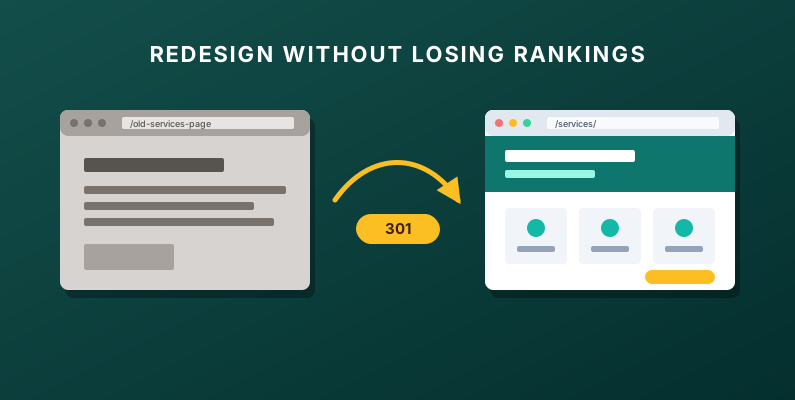
Step 3: Set Up 301 Redirects for Anything That Moves
Sometimes a URL does need to change. Maybe you're combining three thin service pages into one, or your old platform used messy addresses like /page.php?id=12. That's fine, as long as every old URL points somewhere useful.
A 301 redirect tells browsers and search engines that a page has moved permanently. Someone who clicks an old link, or an old Google result, lands on the new page instead of an error. Google's guidance on site moves recommends server-side permanent redirects from your old URLs to the new ones, and notes that 301 and other permanent redirects don't cause a loss in PageRank.
How to plan your redirects:
- Use the page list from Step 1 and write the new URL next to each old one.
- Point each old page to the closest matching new page, not just the homepage.
- Leave the redirects in place long-term. Google suggests keeping them for at least a year.
- Update your own menus and internal links to the new URLs so visitors don't bounce through redirects.
If a page is gone for good with no close replacement, that's okay. Just make it a deliberate decision instead of an accident.
Step 4: Carry Over the Content That Already Ranks
A redesign is a great time to improve your writing. It's also an easy time to throw away the words Google already likes.
For the pages you flagged in Step 1, start from what's already working:
- Title tags and meta descriptions: keep the ones tied to your best searches, or improve them carefully rather than replacing them with something generic.
- Headings: if a page ranks for "deck repair in Moses Lake," don't let the new design swap that heading for "What We Do."
- Body content: keep the useful details, like the services you list, the areas you serve and the answers to common questions. Tighten the wording if you like, but don't cut the substance.
- Image alt text: move it over with the images.
New design, same proven content is a much safer starting point than a blank page.
Step 5: Keep Your Business Information Consistent
Your name, address and phone number should match on your new site, your Google Business Profile and every directory you're listed in. A redesign is a common moment for small differences to creep in, like a new phone number in the footer or a slightly different business name in the header.
Also check the website link on your Google Business Profile. If your homepage address changes (for example, moving from http:// to https://, or from a page builder's address to your own domain), update the link on your profile so it points straight to the new site.
Step 6: Test the New Site Before Launch
Walk through the new site before it goes live, ideally on a preview link:
- On your phone: Is the text readable? Are buttons easy to tap? Does the menu work?
- Speed: Run your key pages through PageSpeed Insights and fix anything that drags.
- Forms: Send yourself a test message from every contact or quote form and make sure it actually arrives.
- Links: Click through the navigation and footer and look for broken links.
- Redirects: Try a handful of old URLs from your Step 1 list and confirm each one lands on the right new page.
It's much easier to fix a broken form on a preview link than to find out a month later that leads have been going nowhere.
Step 7: Watch Search Console After Launch
Launch day isn't the finish line. Once the new site is live:
- Submit the new sitemap in Google Search Console so Google can find your new and updated pages.
- Check the Pages report for errors, especially "Not found (404)" pages. Each one is an old URL that probably needs a redirect.
- Watch impressions and clicks for your important pages and searches over the next few weeks.
Don't panic over a dip in the first few days. Google's site-move guidance says to expect temporary fluctuation in rankings during a move, and it can take a few weeks or more for Google to show the new URLs in place of the old ones. What you're looking for is the trend. If a page that used to get steady impressions drops off and stays down, check its redirect, title and content against your Step 1 notes.
For the bigger picture of what a well-built site needs, our small business SEO checklist covers the rest.
Planning a Redesign?
Columbia Valley Web Designs offers website redesigns for small businesses in Wenatchee and across Central Washington, including Yakima and the Tri-Cities. We handle everything — custom design, hand-coded development, hosting, SEO, and ongoing maintenance — so you can focus on running your business. We create a custom design mockup in Figma so you can see exactly how your site will look before we write a single line of code.
When you contact us, choose "Website redesign" on the form and add your current website. We will respond within one business day to discuss your project, answer any questions, and provide a free estimate. No pressure, no obligations.